
PlayinMatch in a browser tab
PlayinMatch Online — Quick Browser Betting That Skips the 24.8 MB Install
Bet on PlayinMatch online by typing the address into Chrome or Safari and signing in with the username and password you already have. Nothing to install. Indian ISPs block betting domains every so often, so each mirror address opens the same ID with the same balance.
Quick PlayinMatch Online Sign-In From Any Browser Tab
Use the exact username or registered phone your app session uses; the tab reads that one PlayinMatch wallet and nothing else.
Bet in Safari or Chrome Without the APK DownloadHow Do You Bet on PlayinMatch Online in Chrome or Safari? The Quick Browser Route
Open Chrome on Android or Safari on an iPhone, type the PlayinMatch address yourself, sign in with the username and password from your chat, and the whole lobby loads inside the tab. There is no file to fetch and no permission prompt. The balance you see is the one the app would show you.
That is the short answer. The longer one has two or three spots where people trip, so the list below goes slowly. It is written for a phone, because that is where most PlayinMatch online sessions begin; a laptop behaves the same way and gives the bet slip more room.
- Open an ordinary browser tab. Chrome, Safari, Edge and Samsung Internet all load PlayinMatch online. Skip the little browser that pops up inside chat apps, since in practice it tends to drop the session the moment you switch away.
- Type the address by hand the first time. A link forwarded in a group can point at an old mirror, and typing it yourself means you know exactly which PlayinMatch address is in the bar.
- Tap the sign-in control and enter your username or registered phone, then the password. The field rules and the code timing are spelled out on the PlayinMatch login page, so they are not repeated here.
- On a phone or browser PlayinMatch has not seen before, a one-time code arrives. Type it while it is still valid. If it lapses, request a fresh one instead of retyping the old digits.
- Wait for the lobby to finish drawing before you tap anything. Half-loaded pages are where mis-taps happen.
- Glance at the header figure. If it differs from your last session, open bet history before staking, since the wallet is shared with every route you use.
- Choose a cricket market, a dealer room or a crash round, set the stake in the slip and confirm, exactly as you would in the app.
Still without a username? Then the browser cannot help yet, because PlayinMatch IDs are created over WhatsApp. The join PlayinMatch steps handle that, plus the first deposit. Once you have the name, come back to step one; every bet placed in the tab then shows up in the same history the PlayinMatch home lobby keeps.
PlayinMatch Online Page Not Loading? A Quick Switch to a Real Mirror Address
A blank tab where the PlayinMatch lobby used to be feels like a lost account. It almost never is. Providers here cut access to betting domains without warning, one network at a time, so the same address can work on your Wi-Fi at home and fail on mobile data at the bus stop. Try it on the other connection first; if it opens there, you have your answer straight away.
Once you know the block is on your network, pick another mirror from this ledger. The PlayinMatch login and the money behind it travel with you to each of them:
- PlayinMatch online
- What you are reading about now. Pin it from Chrome or Safari; it opens on a laptop too.
- PlayinMatch 365
- Worth pinning as a backup icon, because it is the mirror sign-in for days the main domain will not answer; the PlayinMatch 365 login page explains it.
- PlayinMatch 247
- Keep it bookmarked if you bet late, since this is the round-the-clock address; see PlayinMatch 247.
- PlayinMatch 99
- Typed it from memory and it opened? You are in the right wallet, with the ₹1,500 payout floor unchanged.
- PlayinMatch com mobile
- Lighter than the desktop lobby inside a phone browser, about 3 seconds to load on Jio or Airtel; PlayinMatch com mobile has more.
Pin whichever opened, and remember that a sign-in on any of them touches the same PlayinMatch ledger. Still stuck on every address? Message the desk through the PlayinMatch customer care page and ask which one your network is letting through today.
PlayinMatch Online Sign-In Refused? Safe Moves Before Another Try
Three things cause most refused sign-ins in a browser. The first is plain typing: a saved password from months ago that the browser keeps filling in for you. Delete that saved entry and type the PlayinMatch password fresh.
The second is repeated guessing. After a few wrong passwords PlayinMatch pauses sign-in for a while and the pause lifts on its own; the exact count and wait sit on the login page. Guessing again in a second tab probaby does not help, since it is one account whichever window the attempt comes from.
The third is private or incognito mode. It clears cookies when you close it, so the next visit may look like a new browser and ask for a code again. Not a fault. Just slower. If locks pile up into a blocked account, the unblock request goes through chat, and the format the desk wants is on the customer care page linked above.
PlayinMatch Online on a Laptop — Quick Differences From the Phone Tab
Chrome, Edge, Firefox or Safari on a Mac all open the full PlayinMatch layout, and on a wide screen it is probably the roomiest way to bet. The market, the slip and the balance fit on one screen without scrolling. Stakes can be typed from the keyboard, which is quicker than the phone keypad when you are changing amounts between overs.
The first sign-in from a laptop counts as a new device, so expect the one-time code once, same as a new phone. After that the browser remembers you, as long as cookies stay on.
Two cautions, both about machines you do not own. On an office or cyber-café computer, say no when the browser offers to save the PlayinMatch password, and sign out before you stand up. A closed tab is not a signed-out tab. If the layout feels cramped on a small screen, zooming the browser out by one step usually brings the whole market into view without hiding the slip.
Pin PlayinMatch Online to the Home Screen — a Real App Shortcut With No APK
A pinned icon is a bookmark dressed as an app. Tap it and PlayinMatch online opens on the address you pinned, often without the browser bar, and if your browser keeps cookies you land straight in the signed-in lobby. Nothing gets installed. The phone stores a shortcut and whatever the browser normally keeps for a site, and that is all.
On Android with Chrome, open the PlayinMatch address, sign in once, then use the browser menu and pick the option to add the page to the home screen (some Chrome builds call it install). Give it a name you will recognie and confirm. It sits next to your other apps from then on.
On an iPhone, the pinning happens in Safari and the option hides in the share sheet, since Apple users get no App Store build of PlayinMatch. The exact order of taps is written up on the PlayinMatch app download page next to the Android build, so this page will not duplicate it.
Removing PlayinMatch online later is just as light. Delete the icon, clear the site data for that address in the browser settings, and the phone holds nothing of the lobby any more. No uninstall screen, no leftover file in downloads. Your PlayinMatch account, of course, stays exactly where it was, with the balance intact, ready for the next time you sign in from any address or from the app.
One more thing people ask: can two family members pin the same address on different phones? Yes, the shortcut is only an address. Each person signs in with their own username, because PlayinMatch allows one ID per person (see the PlayinMatch terms) and the icon itself carries no account.
Why a Pinned PlayinMatch Online Icon Stops Working — and the Proven Fix
Here is the catch. The icon points at one address and nothing else. It does not hunt for a new mirror, so when that PlayinMatch domain gets blocked by your provider, the icon opens to an error page and looks broken. It isn't. The address behind it is unreachable, that's the whole story.
The repair takes a couple of minutes. Long-press the icon and remove it, open a working mirror from the list above in the browser, sign in, and and pin that address instead. If you like to keep two ready, name them differently ("PM main", "PM 365") so you can tell them apart in a hurry before a match.
A composite case from the chat: a user in Indore pinned the main PlayinMatch address, and one Saturday evening the icon went blank shortly before the toss. He assumed the ID was gone. It wasn't — he opened the 365 mirror, signed in with the same password, saw the same balance, and pinned the new address under the old name. A few minutes, maybe less.
PlayinMatch Online or the APK? A Genuine Side-by-Side for Indian Phones
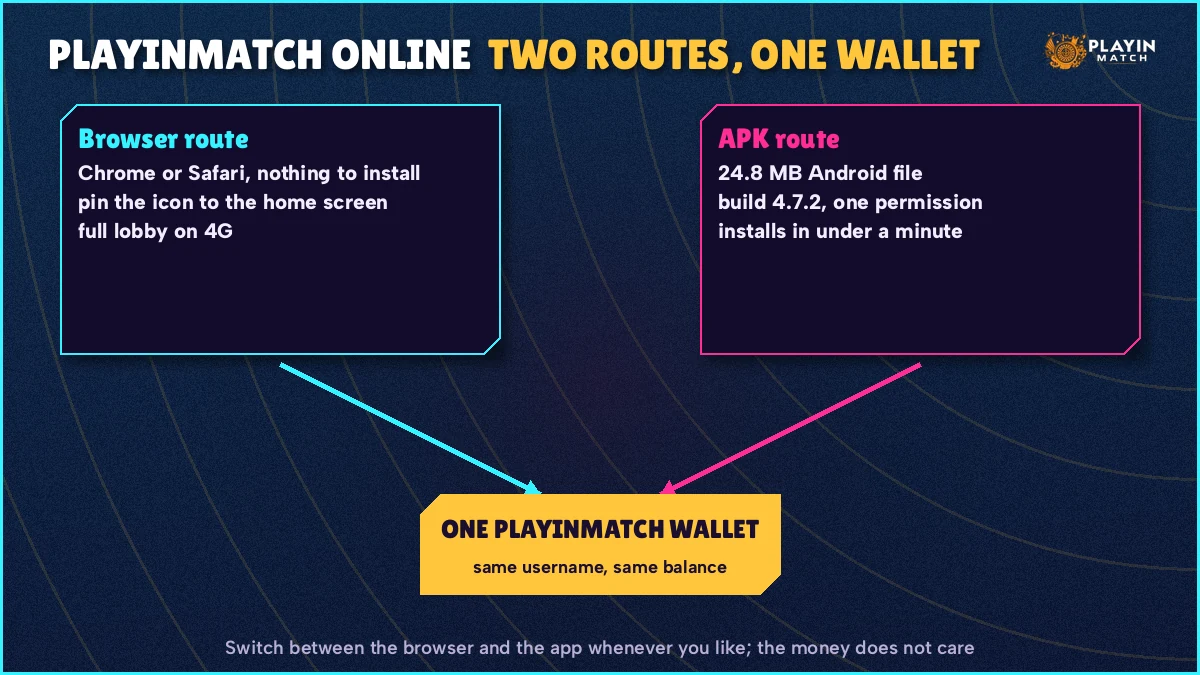
Choosing between PlayinMatch online and the app comes down to two questions: which phone do you carry, and how often does your network block the address you use? An iPhone settles it straight away, since the browser is the only route. On Android it is a genuine choice.
The APK is a 24.8 MB file, Android only, and it asks for a storage permission during setup. The browser asks for nothing. On the other side, the live app keeps the match score next to the bet slip, which a single browser tab on a small screen does not quite manage. Neither route touches a different balance. Both read one PlayinMatch account.
| What you care about | PlayinMatch online (browser) | PlayinMatch APK |
|---|---|---|
| Install | None. Type the address and sign in. | The 24.8 MB file from the app download page. |
| Phones | Android, iPhone, tablets, laptops. | Android phones only. |
| Permissions | No prompt at all. | A storage permission at setup. |
| Home-screen icon | Pinned shortcut you add yourself. | App icon after install. |
| Getting the newest build | Reload the page. | Install the new file; old builds are listed on the old version page. |
| Copies from other sites | Not a concern: no file changes hands. | Third-party copies fail the signature check. |
| Live score beside the slip | Separate tab or page. | Built in, per the live app page. |
| When an address is blocked | Open a mirror, re-pin the icon. | Ask the desk which address to use. |
| Username, password, wallet | Same PlayinMatch account. | Same PlayinMatch account. |
Withdrawals do not care which route you used to place the bet. The limits and the hours the batches run are on the PlayinMatch withdrawal time page, and they read the same from a browser tab as from the app.
Deposits behave the same way from the browser. You pay by UPI, send the UTR in chat, and the credit lands in the one PlayinMatch wallet; how quickly that happens at night is covered on the 247 address page. If a UTR never got sent, or went to the wrong UPI handle, the resend step is on the PlayinMatch withdrawal problem page. Nothing about it is browser-specific.
Plenty of people end up using both, to be fair. The app at home on Wi-Fi, PlayinMatch online on an office laptop or a borrowed phone. Sign out of any shared device when you are done; on a laptop that is one click, and it saves the next person seeing your bet history.
Real Searches That Bring People to PlayinMatch Online
- playinmatch online
- playinmatch online live
- playinmatch online casino
- playinmatch online login
- playinmatch bina app ke kaise khele
- playinmatch browser me kholna
- playinmatch site open nahi ho rahi
- playinmatch online cricket
- playinmatch home screen icon
- playinmatch mobile site
PlayinMatch Online, Live and Casino Searches — Real Answers in a Browser Tab
Anyone who types playinmatch online is usually after one thing: the full lobby inside Chrome or Safari, minus the APK. The hero line and the step list above answer that, and the address ledger explains why a mirror sometimes has to stand in for the main domain.
For playinmatch online live, think of a laptop on match night: market in one window, score in the next, phone left on the table. Nothing extra to install for that.
The playinmatch online casino query covers dealer rooms, Aviator rounds and reels played without installing anything. Same wallet, same history.
- playinmatch online: step two above says type the address by hand, never tap a forwarded group link
- playinmatch online live — exchange markets opened in a Chrome tab during a match
- playinmatch online casino — dealer tables and crash rounds loaded in Safari on an iPhone
- Open the PlayinMatch address in the browser you already use
- Sign in with the username from your chat and clear any new-device code
- Pin the page to the home screen if you plan to come back daily
Every one of these searches ends in the same account. There is no separate online ID, no browser-only balance.
Searches for a PlayinMatch address that refuses to load point back to the ledger in the steps section: pick another mirror there.
PlayinMatch Online Live — Quick Cricket Exchange Bets Inside a Browser Tab
Backing or laying a side, taking a fancy line or a session run: inside a browser tab, PlayinMatch online live betting offers each of these, settled into one wallet. Stake sizes and the commission are on the PlayinMatch exchange page; in-play settlement and the late-night markets get their own write-up on PlayinMatch live sports.
What the browser changes is layout, not markets.
On a phone, a single PlayinMatch tab shows the market and the slip but not the score beside them, which is the one thing the live app does better. On a laptop the gap mostly closes, because you can keep the score board open next to the market. A setup a lot of regular users settle on looks like this:
- Left tab
- The PlayinMatch match market, with the bet slip open.
- Right tab
- The PlayinMatch live score board, runs, wickets and the current over.
- Third tab, optional
- Your bet history, so you can confirm a stake went through without leaving the market.
One habit matters more in a browser than in the app. If a tab has been sitting in the background, reload it before you stake, because a page that has been asleep can still show prices that moved several balls ago. Takes a second. It saves the awkward moment of confirming a slip at a rate that is no longer there.
Data is the other question people ask. A browser tab uses roughly what the app does for the same live session (the figures are on the PlayinMatch live app page), so the choice between them is not really a data choice. On a weak signal at a ground or on a train, the lighter m. address listed above is probably the better PlayinMatch option than the full desktop layout.
Markets open well before the first ball, so there is no need to wait for the toss to sign in. Get the tab loaded, check the balance, and the slip is ready when you are.
PlayinMatch Online Casino in Safari or Chrome — Proven Rooms Without an Install
Most people searching for the PlayinMatch online casino want a yes or no: do the tables run without the APK? Yes. Open the PlayinMatch game lobby in your tab and pick a crash round, a card game, a wheel or a reel. A cricket win from the afternoon is already sitting there as casino balance in the evening, because PlayinMatch keeps a single wallet and no transfer screen exists between the two.
Real Dealer Tables on PlayinMatch Online — Evolution and Ezugi in the Browser
Live dealer rooms from Evolution and Ezugi run inside the browser with no plug-in. Teen Patti with side bets, the Crazy Time wheel, the usual baccarat and roulette tables: all of it. Table minimums and the hours the rooms stay open are on the PlayinMatch casino page, so check there before a late session.
Two practical notes for PlayinMatch dealer rooms in a phone browser. Turn the phone sideways; the table and the betting area usually fit better in landscape. And keep one game per tab. Two dealer rooms open at once in the same browser make both slower, and it is easy to place a chip on the wrong table when the screens look alike.
PlayinMatch Online Casino Crash Rounds and Reels — Safe Habits in a Tab
Aviator, from Spribe, runs in the browser exactly as in the app, auto cash-out field included. The fairness check, meaning the seed you can view after a round, is explained on the PlayinMatch Aviator page, together with why the predictor and hack files passed around in groups cannot read it. Nothing about that changes in a browser tab.
Reels from Turbo and Pragmatic load the same way. Each game carries its own info tab with the return figure and the rules; the line stakes and bonus-buy pricing sit on PlayinMatch com slots. A browser tip that applies here: if a spin seems to hang, open your PlayinMatch bet history before you spin again. The round has most likely settled on the server even if the animation stalled.
Keep this to adults. Everything on PlayinMatch is 18+, and the weekly limits and self-pause options live on the responsible gaming page in the footer.
PlayinMatch Online Questions — Quick, Genuine Answers
Can I use PlayinMatch online without downloading the app?
Yes. PlayinMatch online runs in Chrome, Safari or any current browser, so the 24.8 MB APK is optional. Sign in with the username and password the app uses, and the same balance, open bets and history appear in the tab. A pinned home-screen icon gives one-tap access afterwards.
Is PlayinMatch online live betting the same as in the app?
The markets and the wallet are the same, because both read one PlayinMatch account. What differs is layout: in a browser the score lives on a separate page or tab, while the live app keeps it beside the bet slip. On a laptop, two tabs side by side close most of that gap.
Does the PlayinMatch online casino work on an iPhone?
Yes, through Safari. There is no App Store build, so iPhone users play the PlayinMatch online casino tables, Aviator and reels inside the browser. Add the address to the home screen from the share sheet for a one-tap icon; dealer rooms usually read better with the phone turned sideways.
Why is the PlayinMatch online site not opening today?
A pinned PlayinMatch icon that suddenly shows a blank page or a provider notice points at Jio, Airtel or Vi, not at your PlayinMatch account. Nothing in the wallet changes. Type the PlayinMatch 365 sign-in or 247 address by hand, enter your usual details, confirm the balance matches, then delete the dead icon and pin the new one.
Will my pinned PlayinMatch online icon update itself when the address changes?
No. The icon is a saved shortcut to one address, so if that address gets blocked it opens to an error. Remove it with a long press, open the current mirror in your browser, sign in, and add the new address to the home screen. Username and balance carry across untouched.