
PlayinMatch sign-up desk · two messages
Join PlayinMatch — Quick Signup, ₹500 First Deposit and a ₹200 Referral Credit
Sign up for PlayinMatch by sending two chat messages: your name first, then the username you want. The ID comes back in about 6 minutes. Fund ₹500 by UPI or IMPS and the welcome bonus adds 50%, while the friend whose referral code you used gets ₹200.

Quick PlayinMatch Signup Card: What You Type Once the ID Lands
Day-one use for this card: the username you picked in message two, plus the PlayinMatch password you swap in after the first sign-in.
Start the Two-Message Join, Then Fund ₹500Join PlayinMatch in Three Real Screens: Name, Username, Then the ID
Two messages and a short wait. That is the PlayinMatch signup from end to end, and the three screens below are all you look at before the ID appears.
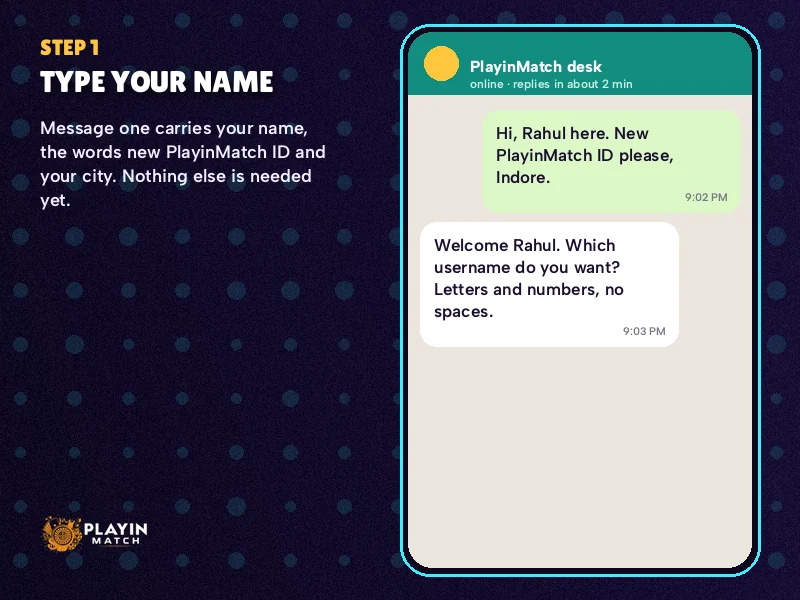
Screen 1 · message one carries your name 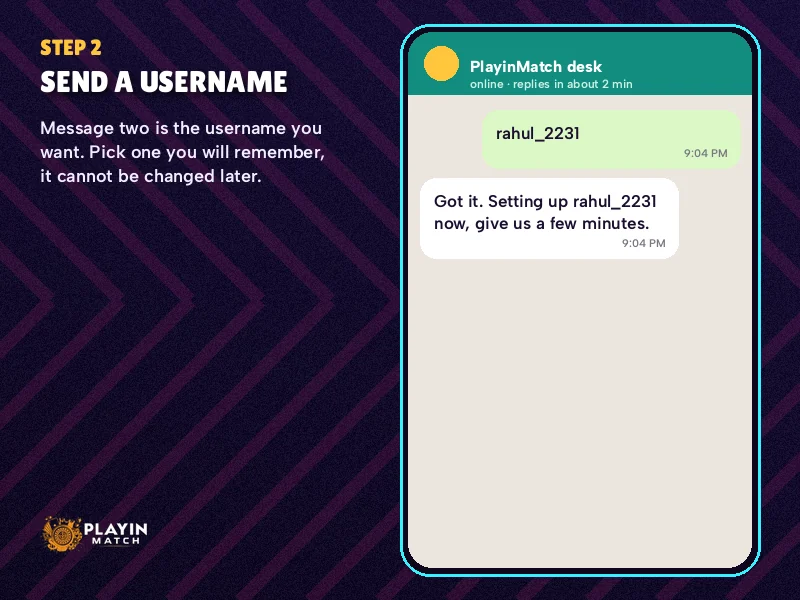
Screen 2 · message two carries the username you picked 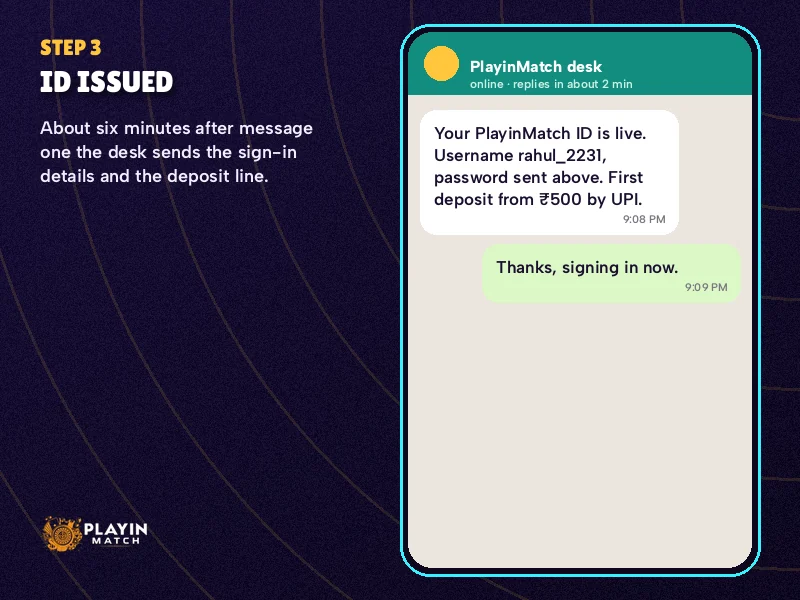
Screen 3 · the ID arrives, roughly 6 minutes on
- Open the chat from the join button. Every button on this page that leads off-site goes to the same PlayinMatch sign-up desk, so it does not matter which one you tap.
- Message one: your name. Use the name on your bank account. That sounds like a small thing; it is not, because payouts later only go to an account in that same name.
- Message two: the username you want. Lowercase letters plus a few digits work well. If it is taken, the desk tells you and you send another.
- Add a promo or referral code now, if you have one. Same message, or a third line straight after. One code per account.
- Give it roughly 6 minutes. Your PlayinMatch ID turns up in the thread you started, with a starting password beside it that you will replace.
- Sign in once and change the password. Then deposit ₹500 or more to switch on the welcome bonus.
Some people prefer an even shorter opener. The five-word line (name, the words new PlayinMatch ID, and your city) is explained on the PlayinMatch customer care number page, along with how quickly the desk tends to reply. Either route ends in the same place. The two-message version just front-loads the username, which saves one round of back-and-forth when your first choice is free.
A word on picking the username, since you will live with it. It is what you type at every PlayinMatch sign-in, on every mirror address and in the app, and it is also the first thing the desk asks for whenever something needs fixing on your account. Short beats clever. Something like ravi_pune22 is easy to read out, easy to type on a small keyboard and hard to confuse with anyone else's. Avoid your phone number as the username (the login screen already accepts the registered phone separately), and skip characters that autocorrect likes to change. If you are joining for a family member, the name in message one has to be theirs, not yours. One person, one PlayinMatch ID.
Why only two messages? Because that is all the desk needs to create the account. PlayinMatch does not ask for documents at signup; identity checks only come up much later, and only on large withdrawals. Once the ID is live, the PlayinMatch home lobby opens with the same username across sports and casino. So the order matters more than the wording: name first, username second, code (if any) third.
A typical case: a member in Nagpur sends her name at 9:10 PM, asks for nisha_ngp, hears it is gone, sends nisha_ngp7 instead, and has a working PlayinMatch ID before 9:20. The swap cost her maybe two minutes. Having a backup username ready costs nothing.
What if nothing comes back after 6 minutes? Hard to say from the outside, but in practice it is usually one of three things: the second message never sent (check for the tick), the username was rejected and the reply asking for another is sitting unread, or the chat was opened from an old saved contact rather than the join button. Re-open the chat from this page and resend the username. Do not start a second thread with a different name, since one person gets one PlayinMatch ID and duplicate requests just slow things down.
How Does the PlayinMatch Referral Code Pay a Genuine ₹200?
The ₹200 goes to whoever handed out the code, meaning the existing PlayinMatch member, and never to the newcomer. It stays pending until the newcomer's first ₹500 deposit clears. Skip that deposit, or pay in less than ₹500, and the sharer sees nothing.
So there are two people in every referral. The sharer, who already has a PlayinMatch account, passes a code to a friend. The friend joins, mentions that code in the sign-up chat (or types it in the drawer), and then makes a first deposit of at least ₹500. Once that money clears, the sharer's wallet shows ₹200.
The joining member is not left out. Their side of the deal is the normal welcome bonus on the first deposit, covered further down. Both things happen off the same ₹500 deposit, which is why people sometimes confuse them.
| Person | What they do | What they receive | When |
|---|---|---|---|
| Existing member (sharer) | Passes their code to a friend | ₹200 referral credit | After the friend's first ₹500 deposit clears |
| New member (joiner) | Quotes the code at signup, deposits ₹500 or more | Welcome bonus of 50%, capped at ₹2,500 | On that first deposit |
Timing trips people up more than the amount does. A friend who joins on Friday but funds the account on Monday releases the ₹200 on Monday, not Friday. And because the trigger is the first deposit specifically, a code quoted after someone has already deposited cannot be attached retroactively. Quote it at signup. That is the one window.
A worked case makes the order clearer. Arjun already plays on PlayinMatch and gives his code to his cousin Karan on a Saturday afternoon. Karan opens the join chat, sends his name, then karan_blr as the username with Arjun's code on the next line. About 6 minutes later the ID arrives. Karan does nothing else that weekend. On Tuesday evening he pays ₹1,000 by UPI and sends the UTR. When that deposit clears, two things land: Karan's welcome bonus of ₹500 (half of ₹1,000) and Arjun's ₹200 referral credit. Had Karan paid only ₹300, neither would have happened, because the first deposit has to reach ₹500.
If you are the sharer and the credit has not shown up, ask the friend one question first: did the first PlayinMatch deposit actually clear, and was it ₹500 or more? Usually that settles it. If both are true, message the desk with your username and the friend's username together.
Where Do You Type the PlayinMatch Promo Code? One Safe Slot per Account
You have two places to put a PlayinMatch promo code, and they do the same job. The first is the sign-up drawer, which opens from the sign-up buttons on this page and has a field for the code. The second is the first chat message itself; add the code on its own line after your username and the desk attaches it when the ID is made.
One code per account. That rule is strict and it applies across both routes, so typing a code in the drawer and then sending a different one in chat does not stack them. The first one recorded is the one that counts.
Drawer or chat, then? It mostly depends on where the code came from. If a friend sent it to you on WhatsApp, copying it straight into the join chat avoids retyping and the typos that come with it. If you saw it printed somewhere and want to check each character before it goes, the drawer field lets you look at it first. Same result on the PlayinMatch side either way: one code, recorded once, attached to the new ID when the desk creates it.
Promo code and referral code are not two separate slots. A friend's referral code fills the same single space. If you hold a promo code and a friend's code at once, pick one before you send message two.
Common reasons a PlayinMatch promo code gets turned down:
- It was sent after the account already existed, so the code slot was closed.
- A code had already been attached earlier, perhaps from the drawer.
- There was a typo; letter O and zero are the usual culprits.
- The code belongs to someone who has since closed their account (ask the friend to check).
Short version. Have the code ready before you start, put it in one place only, and do it at signup.
A small habit that helps: before you make the first deposit, ask the desk in the same thread to confirm which code is attached to the new PlayinMatch ID. It takes one line and one reply. If the the answer is none, you find out while it can still be sorted, not after the money has gone in and the window has closed. People who skip this step are usually the ones writing in a week later asking where a promo went.
And if you have no code at all? Join anyway. The welcome bonus on the first deposit does not need one.
First ₹500 Deposit After PlayinMatch Signup: Proven UPI and IMPS Routes
₹500 is the smallest opening payment a brand-new PlayinMatch wallet takes, sent through UPI or an IMPS transfer. That ₹500 does three jobs at once: it funds the wallet, it switches on the welcome bonus, and (if you joined with a friend's code) it releases their ₹200.
UPI is what most new members use, mainly because it is quicker to set up from a phone. The desk shares the payment handle in the chat; you pay from any UPI app and then send the UTR number back in the same thread. How long the credit takes after that is covered on the PlayinMatch 247 page, which tracks deposit timing through the night.
IMPS suits people who would rather move money from net banking, or whose UPI daily limit is already used up. The flow is the same idea: pay, then send the reference. Either method counts toward the ₹500 floor; there is no extra bonus for one over the other.
With IMPS the reference you paste back is the transaction number your bank shows on the confirmation screen, not the beneficiary name or the amount. A screenshot of that confirmation, sent alongside the number, helps the desk match it faster when two payments of ₹500 arrive close together.
Most first-deposit problems are not payment problems at all. They come down to a missing UTR or a payment sent to an old UPI handle that someone saved weeks ago. Always take the handle fresh from the chat. If you have already paid and the money has not shown up, resend the UTR in the thread before anything else; the full checklist for that sits on the PlayinMatch withdrawal problem page.
One more thing to settle on day one. The bank account you deposit from should be in the same name you sent as message one, because PlayinMatch pays out only to a same-name account. The floor, limits and processing window for those payouts are on the PlayinMatch withdrawal time page. Getting the name right now saves a stuck payout later. That is the whole point of sending your real name first.
Here is roughly how a first PlayinMatch deposit looks from start to finish. You ask in the join thread for the current UPI handle. You pay ₹500 from your own bank app, in the same name as message one. The app shows a UTR reference; you copy it and paste it into the chat. The desk matches the payment, the wallet shows ₹500, and the 50% welcome bonus adds ₹250 alongside it. Total time from tapping pay to seeing a balace is mostly the wait for the credit, which the 247 page tracks in detail. Nothing about this needs a computer. A phone and a UPI app are enough.
PlayinMatch Signup OTP: The Safe Check on Your First Phone
Expect a one-time code the first time your fresh PlayinMatch username is used on any handset. Nothing has gone wrong. The account simply has not seen that device before, and a later switch to another phone brings the same prompt back.
One situation catches new members out. Someone joins on a work phone, then tries the first sign-in at home on a personal one. Both are new devices to the account, so both ask for the code, and if the code goes to a number that is not in your hand, you are stuck until you get back to that handset. Simplest fix: do the first PlayinMatch sign-in on the phone that holds the number you joined with.
The exact length of the code, how long it stays valid, and what happens after repeated wrong passwords are all spelled out on the PlayinMatch login page. Worth reading once before the first sign-in, since the lock that follows too many wrong guesses lifts on its own but does cost you time.
Two habits make the OTP step painless for new PlayinMatch members. Keep the phone number tied to the account on the handset you sign in with, at least for the first login. And change the starting password the desk gave you straight after that first sign-in, so the only person who knows it is you. Why the OTP exists at all, and the other checks around it, are covered on the is PlayinMatch safe page.
Join PlayinMatch Today and Earn Bonuses: Real Welcome Maths up to ₹2,500
The PlayinMatch welcome bonus adds 50% to your first deposit, up to ₹2,500. The arithmetic is simple, but the cap changes the picture at the top end, so here are a few real amounts worked through.
| First deposit | 50% bonus | Bonus credited | Starting balance |
|---|---|---|---|
| ₹500 | ₹250 | ₹250 | ₹750 |
| ₹1,000 | ₹500 | ₹500 | ₹1,500 |
| ₹2,000 | ₹1,000 | ₹1,000 | ₹3,000 |
| ₹5,000 | ₹2,500 | ₹2,500 | ₹7,500 |
| ₹8,000 | ₹4,000 | ₹2,500 (cap) | ₹10,500 |
Past ₹5,000 the bonus stops growing. A first deposit of ₹8,000 earns the same ₹2,500 as one of ₹5,000; the extra ₹3,000 is simply your own money in the wallet. Nothing wrong with that. Just do not expect the 50% to keep scaling.
Bonus money is not withdrawable straight away. It has to be played through a set number of times first, and that rollover multiple, along with how void markets are treated, lives on the PlayinMatch terms and conditions page. Read that before deciding how much to put in. A smaller deposit means a smaller bonus, but also a smaller rollover to clear, and plenty of new members find ₹1,000 or ₹2,000 a more comfortable first step than going straight to the cap.
Putting the three join-day rewards side by side:
- Welcome bonus — yours, 50% of the first deposit, maximum ₹2,500.
- Referral credit — your friend's, ₹200, after your first ₹500 clears.
- Promo code — whatever that specific code offers; one per account, attached at signup.
All three hang off the same moment. Join, quote the code, deposit at least ₹500. Miss the code at signup and the welcome bonus still applies; it is only the code-linked part that is lost. Said another way, beause new PlayinMatch members often assume otherwise: the 50% welcome bonus does not depend on having any code at all.
One rule frames all of this. PlayinMatch is for adults, 18 and over, and each person can hold just one ID, so a second account opened to claim the welcome bonus twice gets closed rather than credited.
Once the bonus is in, the account works like any other PlayinMatch ID. You can stay in the browser or install the Android build; file size, version and the iPhone home-screen route are all on the PlayinMatch app download page. The username and password you set on day one carry across all of it, along with the balance.
Quick PlayinMatch Join Searches People Also Type
- join playinmatch
- playinmatch signup
- playinmatch referral code
- playinmatch promo code
- join playinmatch today and earn bonuses
- playinmatch new id kaise banaye
- playinmatch bonus code kahan dale
- playinmatch login after signup
- playinmatch first deposit 500
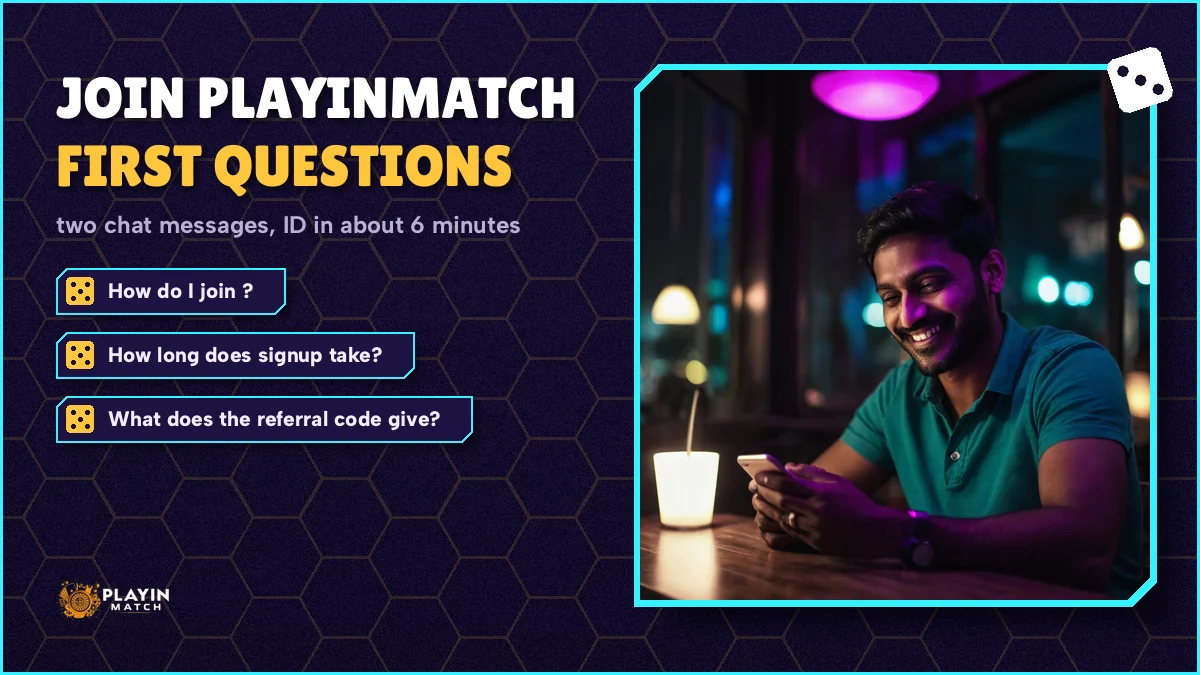
Join PlayinMatch Questions With Genuine Answers
How do I join PlayinMatch?
Open the join chat and send two messages: your full name as it appears on your bank account, then the username you want. Add a promo or referral code on the next line if you have one. The PlayinMatch ID and a starting password come back in the same thread in about 6 minutes.
How long does PlayinMatch signup take?
Roughly 6 minutes from your second message to a working PlayinMatch ID. Most of any extra delay comes from a username that is already taken, so keep a backup choice ready. There is no form and no document upload at signup, which is why the whole process fits inside a short chat.
What does the PlayinMatch referral code give?
The member who shared the code receives a ₹200 credit. It is released once the new member makes a first deposit of at least ₹500 and that payment clears. The person joining gets the normal welcome bonus of 50% on that first deposit, capped at ₹2,500.
Where do I enter a PlayinMatch promo code?
Either in the code field of the sign-up drawer or on its own line in your first chat message after the username. Only one code can sit on an account, and a friend's referral code uses that same slot, so pick one before you send it. Codes cannot be added after the account exists.
What is the minimum first deposit on PlayinMatch?
The first deposit starts at ₹500, paid by UPI or IMPS. That amount activates the 50% welcome bonus and, if you joined with a referral code, releases your friend's ₹200. Pay from a bank account in the same name you gave at signup, since payouts later go only to a same-name account.
Can I join PlayinMatch without a promo code?
Yes. A code is optional and the welcome bonus does not depend on it. Send your name and username, wait about 6 minutes for the ID, then deposit ₹500 or more and the 50% bonus up to ₹2,500 applies. Only the extra offer tied to a specific code is skipped.