
PlayinMatch live app · score and slip together
PlayinMatch Live App — Quick 20-Second Score Refresh Beside the Bet Slip
Follow the match and set your stake from one screen. The PlayinMatch live app reloads the score every 20 seconds in a strip placed right next to the bet slip, so there is no second app to flip to between deliveries. It comes inside the normal Android build, and an hour of live play eats roughly 4-6 MB.

PlayinMatch Live App Sign-In — Quick Before the Next Over
One PlayinMatch login runs the browser account and the live app alike, so the score strip needs no fresh registration, only the username and password you already hold.
Install the 24.8 MB PlayinMatch Build With Live ScoresWhere Does the PlayinMatch Live App Show the Score? A Real Screen Beside the Slip
On any running match, the PlayinMatch live app keeps the score line on the same screen as your bet slip and refreshes it every 20 seconds. You read the state of the game and type the stake in one place. No second app. No switching away between balls, and nothing to install beyond the normal PlayinMatch build.
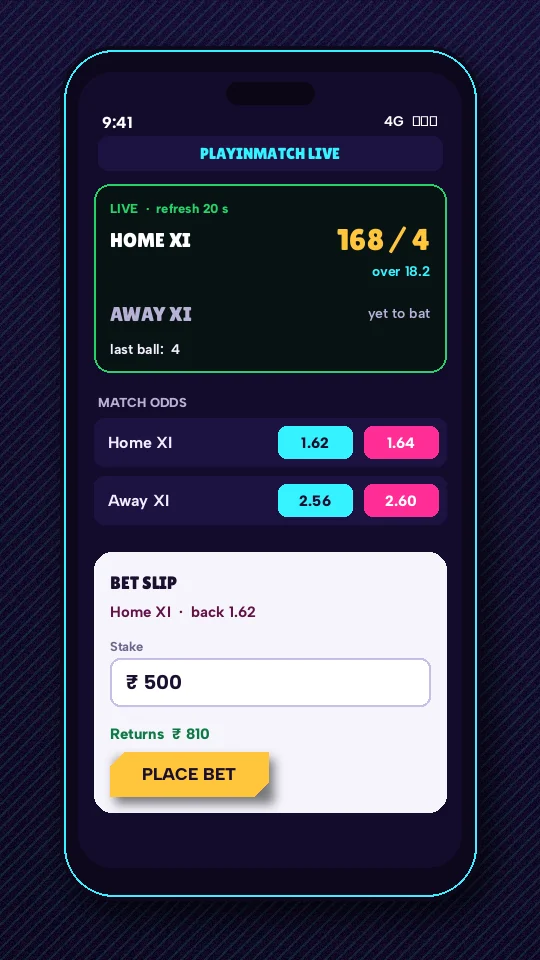
- Score strip. This is the part that moves on its own. Runs, wickets and the over in progress reload every 20 seconds while the match is live, with no tap needed from you. For the full card and the earlier overs, the PlayinMatch live score page for today's matches carries the whole board.
- Market rows. The middle band is whichever PlayinMatch price list you tapped into. So the number you are about to accept is sandwiched between what just happened on the pitch and what you are about to risk.
- Bet slip. The amount you type, and the confirm action. Nothing on the strip changes what is in the slip; it only tells you what happened on the field while you were deciding.
Why bother putting the two together? Because the usual way people follow a game while staking is clumsy: a score app in one window, PlayinMatch in another, and a thumb flicking between them every few balls. Each flick is a few seconds of not looking at the slip. Over a long innings that adds up to a lot of half-finished stakes and a lot of second-guessing.
A composite case, stitched from the sort of thing members describe: Karan in Indore had a stake typed into the PlayinMatch slip during the 18th over of an evening T20 when the strip flipped to show a wicket. He cleared the amount, watched one more refresh, then decided again. Four seconds of reading. No app switch.
Notice what the mock leaves out. There is no commentary feed in the strip, no ball-by-ball list, no wagon wheel; it is a compact line meant to be read in a glance while your thumb is on the stake. Anything deeper sits on the PlayinMatch scoreboard page linked above, and you can open that on a laptop while the phone holds the slip if you like a second view.
That is roughly all the PlayinMatch live app is for. It does not predict anything, and it is not a broadcast (there is no video in the strip, just the numbers). Casino rooms, crash rounds and the rest of the account still start from the PlayinMatch home lobby; the strip only lives on cricket match screens.
PlayinMatch Live App 20-Second Refresh — Real Timing Across a Single Over
Twenty seconds sounds abstract until you put it against the pace of a match. In the PlayinMatch live app that interval means three score updates every minute, about 180 an hour, and a T20 over that runs three to four minutes usually gets somewhere between nine and twelve reloads of the the strip. Roughly two per delivery, give or take a review or a field change.
So what does the delay actually look like? If a boundary lands just after a reload, it waits close to the full 20 seconds before it appears. If it lands just before one, you see it almost straight away. Averaged out, an event reaches the PlayinMatch strip about ten seconds after the refresh window opens. That is the theory. In practice a slow mobile signal adds its own few seconds on top, and on a crowded stadium network it can add more.
Nobody is claiming the strip beats the ball. It does not, and a 20-second cycle is not ball-by-ball. What it does is keep the PlayinMatch score fresh enough that you are never staking on a game state that is minutes old, which is exactly what happens when the score lives in a diffeent app you forgot to reopen.
Strip looks frozen? First check whether play has stopped. Drinks, a strategic break, a review, rain, or the gap between innings all leave the PlayinMatch strip sitting still for good reason, since there is nothing new to show. If the over number has not moved for well over a minute while play is clearly on, the phone has most likely dropped its connection; the next successful refresh after the signal returns brings the line up to date.
Here is one over, sketched against the reload clock. The ball times are an illustration only, not a real match, but the arithmetic is exactly what the PlayinMatch strip does:
- 0:00
- Strip reloads. Over starts; you open the slip.
- 0:07
- First ball, a single. Nothing on screen yet.
- 0:20
- Reload. The single shows, thirteen seconds after it happened.
- 0:38
- Second ball, wicket.
- 0:40
- Reload. Wicket shows two seconds later, about as lucky as it gets.
- 1:02
- Third ball, a four after a long walk-in from the new batter.
- 1:20
- Reload. Boundary on screen eighteen seconds after the ball, close to the worst case.
Reviews behave in a predictable way too. While the third umpire looks at a replay, the PlayinMatch strip should simply hold the last confirmed state; a dismissal overturned on review never shows at all, and one that stands lands on the first reload after the decision. Nothing on the strip is a guess about what the umpire will do.
Two seconds in one place, eighteen in another. That spread is normal and it is why reading the over number matters more than reacting to the first flicker on the PlayinMatch strip.
Settlement is a separate matter. How PlayinMatch settles in-play markets once the result is in, and which late-night markets stay open, is laid out on the PlayinMatch live sports page covering in-play settlement. The live app only shows you the score while you decide; it does not change how a market is graded.
One small habit helps. Glance at the over number beore you confirm. If it matches what you expect, the PlayinMatch strip is current; if it looks a ball or two behind, wait one cycle. Twenty seconds is short.
Quick PlayinMatch Live APK Install — Safe Steps From File to Score Strip
The quickest route to the PlayinMatch live app on Android is to install the normal APK from the PlayinMatch app download page, sign in with your existing details, and open any match in play. The score strip is already part of that build, so there is no plugin, no second file and no separate live download to hunt for.
- On the phone itself, open the PlayinMatch app download page with the current Android file and take the APK from there. Android version support, build number and install time are all listed on that page.
- Android pauses and asks about installs from an unknown source. Say yes for the browser that fetched the PlayinMatch file, nothing wider.
- Launch the app. Your browser account carries straight across, balance and all, so the wallet is already sitting there when the strip first loads; a handset PlayinMatch has never met adds a code check, timed on the PlayinMatch login page.
- Pick a fixture that is already under way, not an upcoming one. Only a running game feeds numbers into the PlayinMatch strip, and the slip opens beneath it.
- Leave it alone. The strip reloads every 20 seconds without a pull or a tap.
iPhone owners are in a different spot. PlayinMatch has no App Store build, so there is nothing to install from Apple; the app download page explains the home-screen shortcut route that Safari offers instead. Whether that shortcut behaves exactly like the Android strip is hard to say from here, so check it on a live match before you rely on it.
Still running an older PlayinMatch build on Android? It may well sign in. The PlayinMatch APK old version page on which builds are safe covers what still works, which build to move to, and why copies picked up from third-party download sites get rejected at the signature check. If your strip is missing or acting oddly on an old build, that page is the first stop rather than reinstalling blind.
Installed PlayinMatch but no score strip? Work down this short list before anything else.
Is the match actually live? A fixture that has not started has nothing to put in the strip, and a finished one has stopped changing. Open a game already under way.
Did Android refuse the install with an app-not-installed message? That usually means a copy signed by someone else is already on the phone. Remove it, then install the PlayinMatch file again from the download page.
Is it an older build? Then the old-version page above tells you whether to move up.
A newer PlayinMatch build turns up later? Install it over the current one, from the same download page. Login and wallet belong to the account rather than the handset, so the swap costs you nothing but a short wait, and the score strip comes back with the fresh install. Probably the dullest part of owning the app (good).
PlayinMatch Live App Searches — Real Phrasing People Type
- playinmatch live app
- playinmatch live apk
- playinmatch live app download
- playinmatch live apk download
- playinmatch live score app
- playin match live app
- playinmatch live match app
- playinmatch live apk latest
- playinmatch live wala app
- playinmatch score app kaise chalaye
PlayinMatch Live App and Live APK — Genuine Meanings on This Install
Real meaning of the PlayinMatch live app once the score strip is open
People type playinmatch live app when they want the match score and the stake box on one phone screen. On this install that means the strip refreshing every 20 seconds above the slip, inside the same PlayinMatch build used for everything else on the account.
- Same PlayinMatch username and password as the browser login, typed once on the phone.
- Score strip loads the moment an in-play cricket match is opened from the lobby.
- About 4-6 MB of data for each hour the strip stays open during live play.
Why a PlayinMatch live APK search reaches the same genuine Android file
A search for playinmatch live apk suggests a special file just for scores. There is none. The live strip ships inside the standard 24.8 MB PlayinMatch APK, so a download offered under a separate live label from some other site is a repackaged copy.
- The download page on playin-match.pro is the single source for the PlayinMatch live APK file.
- Compare the file size on your phone with the published figure before you tap install.
- Use the old-version page if an earlier PlayinMatch build is already on the handset.
Either phrase leads to the same place: one Android file, one PlayinMatch account, and a score line sitting next to the slip.
Is the PlayinMatch Live APK a Separate Download? The Genuine File Answer
No. The PlayinMatch live APK is the same 24.8 MB file as the regular Android app; the 20-second score strip is built into it rather than sold or shipped as an extra. If you already have the current PlayinMatch app, you already have the live app, and there is nothing else to fetch.
The confusion is understandable. Search for the phrase and you will find pages offering a "live" version as though it were its own product, sometimes with a fresh-looking icon and a version number that does not match anything PlayinMatch publishes. Those are copies. Some are harmless repacks; some are not, and you cannot tell which from the download button.
A quick physical check works better than reading reviews. The genuine PlayinMatch file is 24.8 MB. If the APK sitting in your downloads folder is a noticeably different size, it is not the file from the PlayinMatch Android download page, whatever its name says. Delete it and take the one from there. Small gaps are fine, by the way: a file manager may show a slightly different figure depending on rounding, or because it counts in MiB rather than MB. A few tenths off is rounding. Half or double the size is a different file. That one check catches most fakes, honestly more than any amount of squinting at screenshots.
Forwarded APK on chat? A friend sends you a PlayinMatch live APK in a group. Before tapping it, long-press the file and look at the size. Not 24.8 MB means not the real PlayinMatch build, even if the friend meant well. The older-build page explains why third-party copies fail the signature check, so you know what you are avoiding.
Why keep it as one file at all? Because two builds would mean two update cycles, two sets of instructions and twice the chance of a member running a stale copy without knowing it. With a single PlayinMatch APK, whatever fixes or changes reach the betting screens reach the score strip in the same install.
Version numbers, the Android floor and install time belong to the download page and change when a new build goes out, which is why they are not repeated here. The file size is the part worth remembering, because it is the part you can check in two seconds on the phone itself. Same file, same strip, same PlayinMatch account.
How Much Data Does the PlayinMatch Live App Use? Real Numbers per Match
Expect roughly 4-6 MB of mobile data for every hour the PlayinMatch live app stays open on a match in play. That figure covers the score strip refreshing every 20 seconds alongside the slip and market rows. Spread over about 180 refreshes an hour, it works out to something like 22-33 KB per cycle, if you pin the whole amount on the strip, which is a simplification but a useful one.
What does that mean across a whole game? The table below multiplies the hourly PlayinMatch figure by typical match lengths. Match durations are approximate (overs run long, rain happens), so treat the right-hand column as a ballpark, not a bill.
| Format | Rough time with the strip open | Estimated data |
|---|---|---|
| T20 match, start to finish | about 3.5 hours | 14-21 MB |
| One innings of a T20 | about 1.5 hours | 6-9 MB |
| One-day match | about 8 hours | 32-48 MB |
| A full Test day | about 7 hours | 28-42 MB |
Put another way, a whole T20 on PlayinMatch costs less data than a few minutes of video on most phones. Even a full one-day match sits comfortably under fifty megabytes. People on a small daily pack can usually leave the strip running all evening and still have most of the allowance left for everything else.
Two caveats. First, the 4-6 MB range is for live match play with the score strip; it says nothing about PlayinMatch live dealer rooms or other video-based tables, which are almost certainly a heavier load and have not been measured for this page. Second, the range is per hour of the app being open on a live match, so a phone left on the lobby or on a finished game is a different case.
A worked weekend, to make it concrete. Say a double-header Sunday: two T20s back to back, the PlayinMatch strip open for both, roughly seven hours in total. At 4-6 MB an hour that comes to somewhere between 28 and 42 MB for the day. Add a one-day match the following Saturday and the week's live-app total is still well under a hundred megabytes, which on most Indian prepaid plans is a rounding error.
Where the number can creep up is the stuff around the strip rather than the strip itself: opening match after match to compare, flicking back to the lobby, reloading screens by hand. None of that is measured in the hourly PlayinMatch figure, so if your own usage looks higher than the table, that is the likeliest reason.
If data really is tight, the simplest saving is to close PlayinMatch between matches instead of leaving it on a dead screen. On Wi-Fi none of this matters much.
PlayinMatch Live App Questions — Quick, Real Answers
How often does the PlayinMatch live app update the score?
Every 20 seconds. The PlayinMatch live app reloads the score strip beside the bet slip three times a minute while a match is in play, with no tap needed. It is not ball-by-ball, so an event can take up to one full cycle to appear, and a weak mobile signal may add a few seconds.
Is there a separate PlayinMatch live APK to download?
No. The PlayinMatch live APK is the same 24.8 MB Android file as the regular app, with the score strip built in. Take it from the app download page on this site. Any file offered elsewhere under a separate live label, or showing a different size, is a repackaged copy and should be deleted.
How much mobile data does the PlayinMatch live app use?
Roughly 4-6 MB for each hour the PlayinMatch live app stays open on a match in play. A full T20 therefore lands somewhere around 14-21 MB. That range covers the score strip and slip only; live dealer video rooms are a different and heavier load that this estimate does not include.
Can I use the PlayinMatch live app on an iPhone?
Not as a downloaded app. Apple's store has no PlayinMatch listing, and the iPhone route on the PlayinMatch app download page uses a Safari home-screen shortcut instead. Before trusting it during a chase, open a match that is already running and watch the score line through a few 20-second cycles.
Is the PlayinMatch live app safe to install?
The genuine PlayinMatch file from the app download page is the safe one, and its size should read 24.8 MB on your phone. Copies from third-party download sites fail the signature check and should be avoided. A new phone also asks for a one-time code at first sign-in, which adds a check on the account.